Strawing Blog Archivers
Strawing Blog » Archivers » Windows Server (2025) 桌面化配置 Checklist
Windows Server 2025还原生加入了蓝牙支持,这下在笔记本上功能也不差什么了。
这里做个桌面使用Windows Server 2025 (2022/2019等老版本的也可以参考)桌面化/桌面使用的配置和checklist,把一些配置改成适合桌面使用的,以下是一些我自己常用的配置,大家可以自取所需。
# 禁用锁屏界面 (不显示那个时钟,直接显示输密码的那个界面)
reg add "HKLM\SOFTWARE\Policies\Microsoft\Windows\Personalization" /v "NoLockScreen" /t REG_DWORD /d 1 /f

# 登录界面(输密码的那个界面)背景不模糊
reg add "HKLM\SOFTWARE\Policies\Microsoft\Windows\System" /v "DisableAcrylicBackgroundOnLogon" /t REG_DWORD /d 1 /f

# 禁用自动下载&安装更新(仅检查更新并通知,不自动下载安装)
reg add "HKLM\SOFTWARE\Policies\Microsoft\Windows\WindowsUpdate\AU" /v "NoAutoUpdate" /t REG_DWORD /d 0 /f
reg add "HKLM\SOFTWARE\Policies\Microsoft\Windows\WindowsUpdate\AU" /v "AUOptions" /t REG_DWORD /d 2 /f
reg add "HKLM\SOFTWARE\Policies\Microsoft\Windows\WindowsUpdate\AU" /v "ScheduledInstallDay" /t REG_DWORD /d 0 /f
reg add "HKLM\SOFTWARE\Policies\Microsoft\Windows\WindowsUpdate\AU" /v "ScheduledInstallTime" /t REG_DWORD /d 3 /f
reg add "HKLM\SOFTWARE\Policies\Microsoft\Windows\WindowsUpdate\AU" /v "ScheduledInstallEveryWeek" /t REG_DWORD /d 1 /f
reg add "HKLM\SOFTWARE\Policies\Microsoft\Windows\WindowsUpdate\AU" /v "AllowMUUpdateService" /t REG_DWORD /d 1 /f

# 禁用询问关机原因
reg add "HKLM\SOFTWARE\Policies\Microsoft\Windows NT\Reliability" /v "ShutdownReasonOn" /t REG_DWORD /d 0 /f

# 不用按Ctrl+Alt+Del登录
reg add "HKLM\SOFTWARE\Microsoft\Windows\CurrentVersion\Policies\System" /v DisableCAD /t REG_DWORD /d 1 /f

# 下面这个能启用在netplwiz中启用自动登录 (不然「要使用本计算机,用户必须输入用户名和密码」那个选项不显示)
reg add "HKLM\SOFTWARE\Microsoft\Windows NT\CurrentVersion\PasswordLess\Device" /v DevicePasswordLessBuildVersion /t REG_DWORD /d 0 /f

# 然后
netplwiz
# 去掉那个「要使用本计算机,用户必须输入用户名和密码」,输入密码,就能配置自动登录了

# 登录界面右下角显示电源菜单(关机重启)
reg add "HKLM\SOFTWARE\Microsoft\Windows\CurrentVersion\Policies\System" /v ShutdownWithoutLogon /t REG_DWORD /d 1 /f

# 登录界面默认自动打开小键盘Num Lock
reg add "HKEY_USERS\.DEFAULT\Control Panel\Keyboard" /v InitialKeyboardIndicators /t REG_SZ /d 2 /f

# 禁用启动项延迟自启(Explorer运行后立马自启)
reg add "HKLM\Software\Microsoft\Windows\CurrentVersion\Explorer\Serialize" /v WaitForIdleState /t REG_DWORD /d 0 /f
reg add "HKLM\Software\Microsoft\Windows\CurrentVersion\Explorer\Serialize" /v StartupDelayInMSec /t REG_DWORD /d 0 /f

# 启用休眠
powercfg /h on

# 卸载 Windows Defender
Uninstall-WindowsFeature Windows-Defender

# 安装 Microsoft Store
wsreset -i
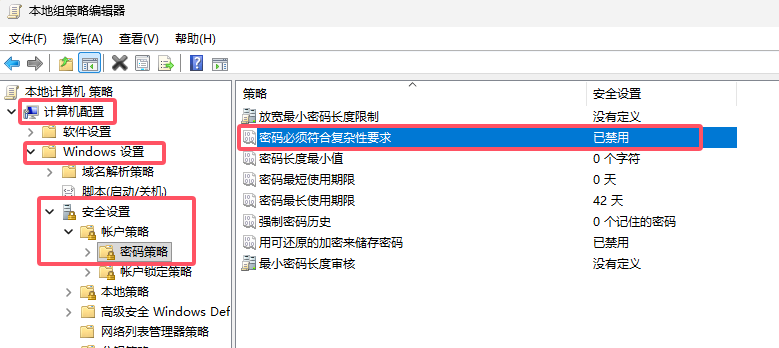
禁用密码复杂度要求:
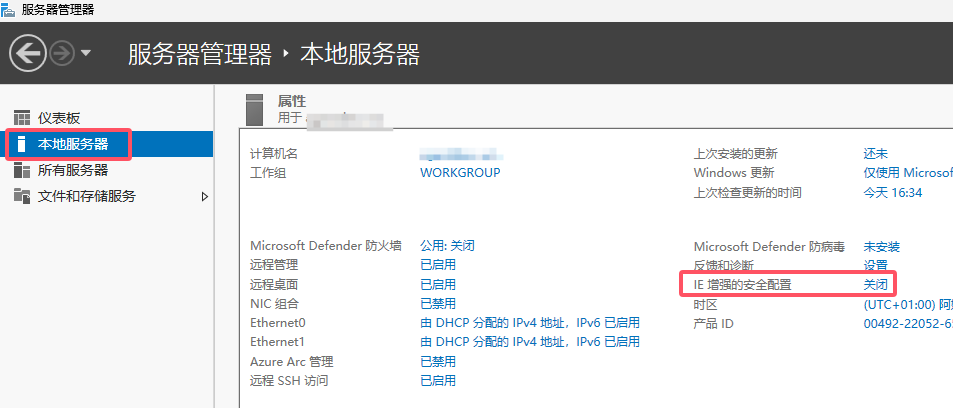
关闭 IE增强安全配置:
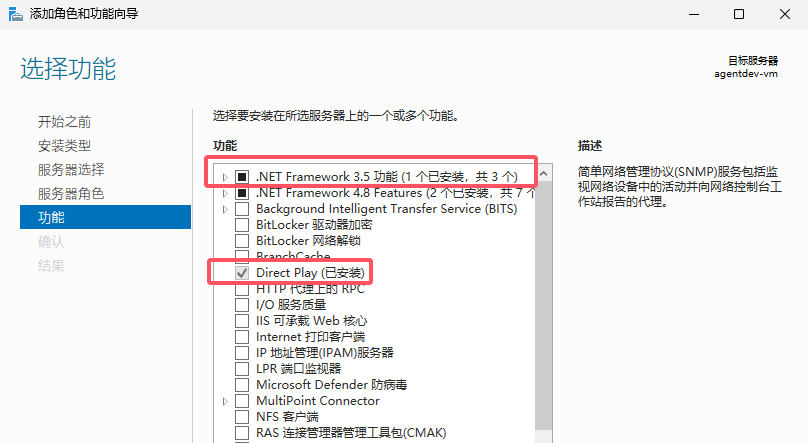
安装.NET 3.5和Direct Play:
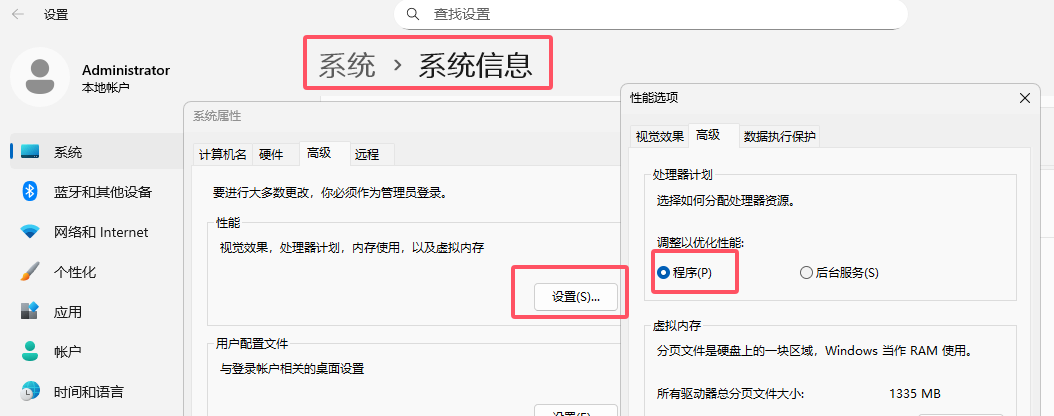
处理器计划改成「程序」:
免费安装「来自设备制造商的 HEVC 视频扩展」,让浏览器和一些播放器能播放H265/HEVC视频:
1. 打开 https://store.rg-adguard.net
2. 把这个链接【https://apps.microsoft.com/detail/9n4wgh0z6vhq】贴进去
3. 下载下面搜到的那个AppxBundle来安装
Server系统下载官方渠道:
https://www.microsoft.com/zh-cn/evalcenter/download-windows-server-2022
https://www.microsoft.com/zh-cn/evalcenter/download-windows-server-2025
然后可以通过
https://github.com/massgravel/Microsoft-Activation-Scripts
这个MAS脚本转换成非评估版并激活